
How to Implement a BMS in Your Company, Step by Step

When a company starts planning a Building Management System (BMS) implementation, the conversation usually focuses on hardware: which controllers to install, which protocols to choose, or which manufacturer to work with. That’s an important part of the project, but not the only one.
Because a BMS project isn’t just about equipment. It also defines how facilities will be managed in the years ahead and, above all, what will be done with the data the system generates. If that part isn’t addressed properly, the risk is ending up with an installation that’s connected but poorly integrated into day-to-day operations.
What Does a BMS Project Really Involve?
A well-designed BMS project typically rests on four layers that need to work together:
- Field layer (DCS/BMS): the physical hardware installed on site — controllers, actuators, temperature sensors, meters or motorized valves.
- Connectivity layer (datalogger/IoT): the infrastructure that carries data from the installation to the platform, using protocols such as Modbus, BACnet or KNX.
- Management software layer: the environment where data becomes useful information through dashboards, alerts, reports or automated rules.
- Operations layer (control team): the people and processes that will use the system every day.
In many projects, the first two layers are well resolved while the last two are left for later. When that happens, the system records information, but it becomes harder to turn that data into operational decisions, response rules or genuine tracking of the installation.
It’s worth distinguishing a BMS from a platform like OTEA, the platform developed by EcoMT, which works as an EMOS and connects energy, operations, maintenance and control capability within a single environment.
If it’s still not clear how a BMS differs from other solutions, it’s worth reviewing Differences between EMS, BMS and SCADA first.
When Is the Right Time to Implement a BMS?
The answer depends on the stage the building is at.
For new construction, the best approach is to incorporate the BMS during the design phase. Integrating it from the outset makes it possible to define the architecture more effectively, plan for future expansion, and avoid later modifications to systems that are already installed.
For an existing building, implementation is also feasible, although it requires a more detailed upfront analysis: taking stock of equipment, reviewing current automation levels, and checking what can be integrated without replacing elements that are still working properly. In these cases, open architectures and flexible APIs make progressive integration easier.
To assess the automation level and the technical fit of the project, it’s useful to refer to standard UNE-EN ISO 52120-1 — the European standard on the contribution of building automation, controls and building management to energy performance — within the BACS (Building Automation and Control Systems) framework.
Phases of BMS Implementation
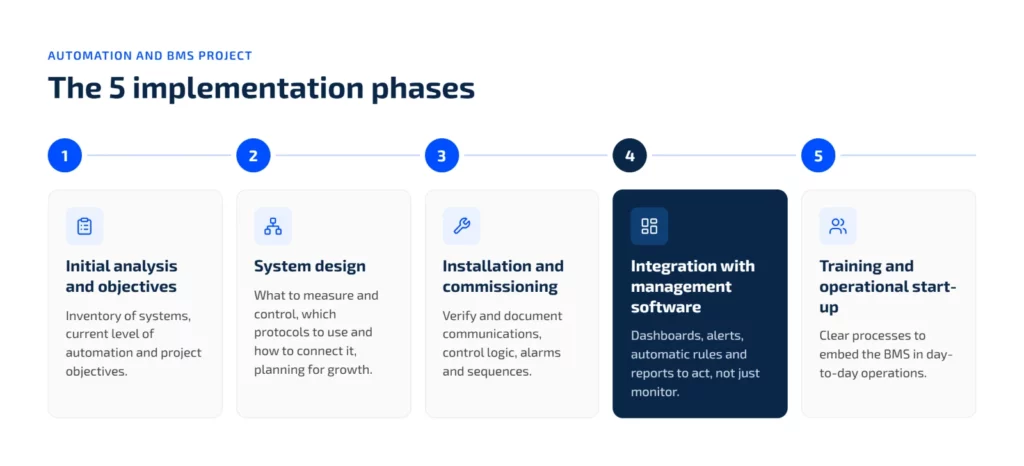
1. Initial Analysis and Defining Objectives
The first step is to review the starting situation and define what’s expected from the system. In practice, this means taking stock of systems such as HVAC, lighting, metering, industrial refrigeration or access control, identifying the current automation level, and setting objectives such as energy efficiency, predictive maintenance, RITE (Spain’s Thermal Installations in Buildings Regulation) compliance, or multi-site management.
If this phase isn’t well defined, the rest of the project tends to rely on assumptions — which usually translates into later adjustments to scope, timelines or integration.
2. System Design: What to Automate and How to Connect It
With objectives already defined, the system architecture is designed: which variables will be measured and controlled, which protocols will be used, and how everything will connect to the management platform.
This is also the time to plan for growth. If the installation is going to expand, add new sites, or incorporate more measurement points, that possibility should be built into the design from the start, rather than forcing a rework of the architecture later on.
3. Installation and Commissioning
Physical installation is only part of the project. Commissioning means verifying and documenting that what was designed works as intended: communications, control logic, equipment response, alarms and operating sequences.
Beyond checking that everything works, this phase should leave a solid documentation base for operations and maintenance. When this part is handled well, the subsequent start-up runs more smoothly, with fewer recurring issues.
4. Integration with the Management Software
In this phase, the captured data is connected to the management platform to configure dashboards, alerts, automated rules and reports. This is the step that turns the system into a working tool for operations, maintenance and energy tracking.
It’s worth stressing an idea that fits with OTEA’s approach: monitoring without control isn’t worth much. If the system only shows consumption figures or status data, but doesn’t help detect deviations, trigger actions or act on connected equipment, the BMS stays at the level of supervision.
5. Training and Operational Start-Up
Installed technology alone doesn’t guarantee the system will be used well. For the project to work, processes need to be defined: who reviews alerts, how incidents are managed, which indicators are tracked, and which team acts in each case.
Training, therefore, shouldn’t be limited to explaining the interface. It also needs to help embed the BMS into day-to-day operations, so it doesn’t end up used only occasionally after start-up.
How Long Does It Take to Implement a BMS?
Timing depends on the scope and complexity of the project. As an indicative reference only — actual timelines vary from project to project — a medium-sized building with relatively well-defined systems can typically become operational within roughly 8 to 16 weeks from the start of the design phase.
In multi-site environments, or those integrating highly diverse infrastructure, the timeline can extend to several months. In many cases, delays come less from the technology itself than from an incomplete inventory or a lack of coordination between the suppliers of different subsystems.
Mistakes That Make Implementation More Expensive or Slower
- Not defining objectives before choosing the technology. Starting with hardware without a clear purpose can lead to systems that are oversized or too limited for what the installation actually needs.
- Leaving the software until the end. If the management platform isn’t factored in from the design stage, it tends to fit less well with the rest of the system later on.
- Underestimating integration with existing equipment. Real installations mix different manufacturers and generations; not accounting for this multiplies adjustments during commissioning.
- Not involving the operations team. If the system is designed without input from the people who will use it afterward, day-to-day operation loses consistency.
How to Know If a BMS Provider Is the Right One
For a deeper look at this point, see How to choose a BMS. As a quick check, it’s enough to see whether the proposal is limited to hardware or also covers connectivity, software and operations.
A provider that only supplies equipment leaves out a critical part of the project. A well-executed implementation, by contrast, connects that technical foundation to real-world use of the system and to the automation of your facilities, so the BMS doesn’t end up limited to visualization.
Ultimately, a BMS implementation is judged by what happens after commissioning: whether alerts actually get reviewed, whether deviations trigger action, and whether the system becomes part of how the facilities team works day to day. Getting there means treating the field, connectivity, software and operations layers as one connected process from the start, with clear ownership and routines in place, rather than as separate deliverables handed off at the end of the project.

Recommended for you

You deserve a facility management system that works with you
Request a free demo and discover how other maintenance, sustainability, and energy efficiency teams are achieving real results. No unnecessary complexity. Just a clear roadmap designed to scale with you.




